Your clan.
Your Discord.
The ClashScout bot brings full clan management into your Discord server. Applications, war alerts, member tracking, and instant lookups, all in one place.
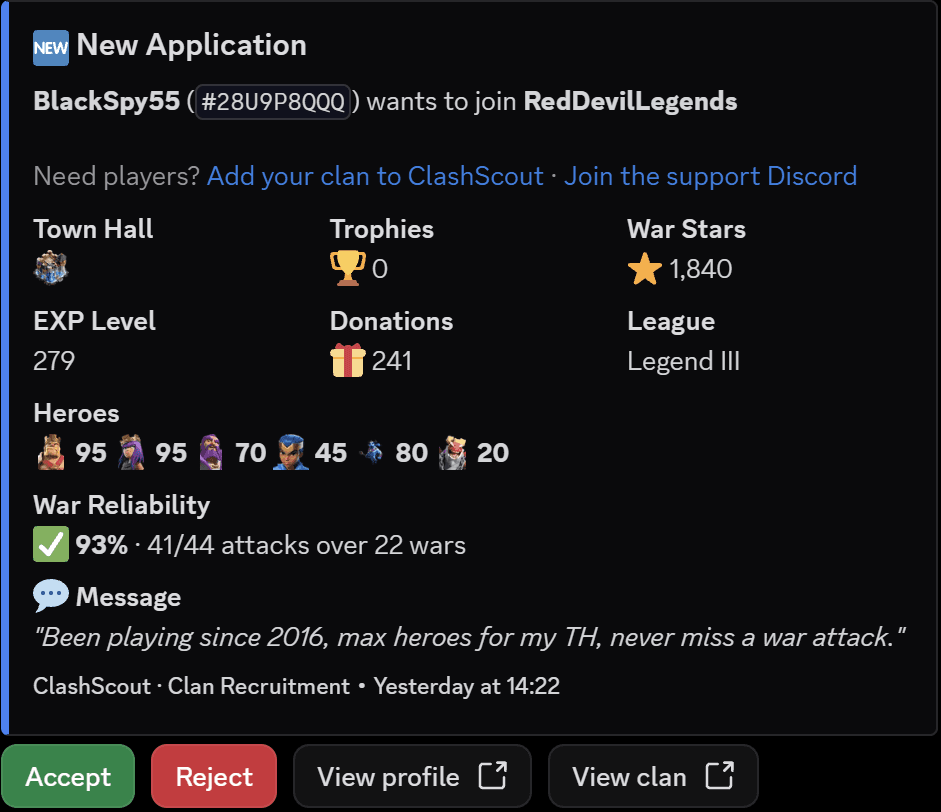
Application Management
Accept or reject in one click
Every application lands in your Discord channel with the player's full stats: town hall level, trophies, war stars, hero levels, and their message. Make the call without opening a single browser tab.
- Full player stats pulled live from the CoC API
- Accept / Reject buttons right on the message
- Applicant gets an email when you decide
- Card updates to show who processed it
- Works for every leader connected to the clan
Automated Alerts
Never miss a moment
ClashScout watches your clan around the clock and posts to Discord automatically. No more checking the game every hour to see if war started.
Seventeen alerts in total, and every one of them picks its own channel. Run /notifications in your server, choose a channel, and tick what belongs there: war in one, recruitment in another, capital in a third.
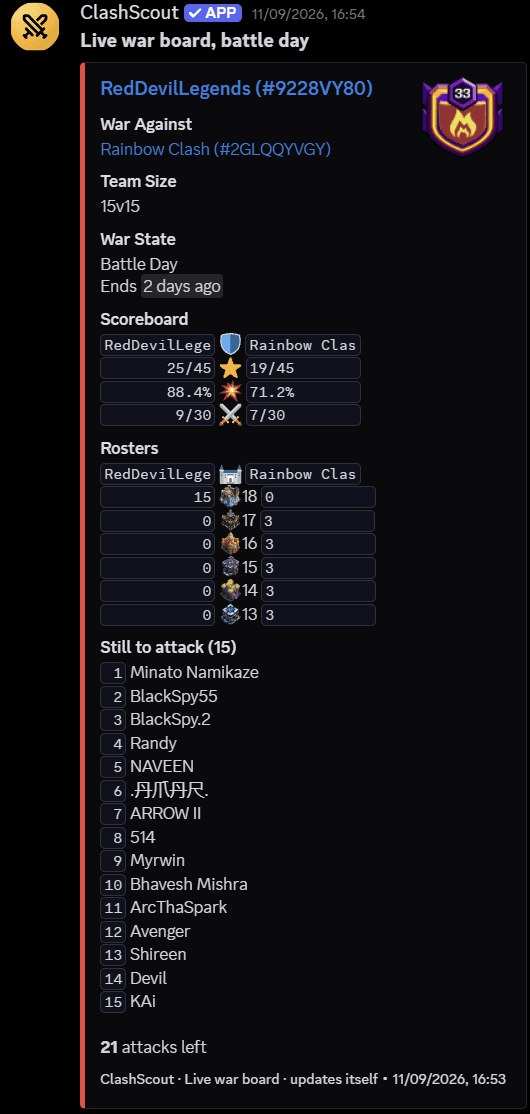
Live war board
One message per war that rewrites itself as the war goes, with both rosters, live countdowns and who still owes attacks
War preparation
Opponent, war size and a countdown to battle day
Battle day
Posted the moment attacks open
Attack reminder
The final hours, naming everyone who still has attacks left
War result
Won, lost or drawn, with final stars and destruction
Post-war report
MVP, attack usage and who missed
Joins and leaves
Who arrived and who left since the last check
Promotions and demotions
In-game role changes, with the old role and the new one
Town Hall upgrades
Posted when a member finishes a new Town Hall
Weekly donations
Top donators and everyone who gave nothing
Raid weekends
Loot, top looters and who left capital attacks unused
Daily digest
Every application still waiting for a decision
Slash Commands
Instant CoC lookups, anywhere
Type a command in any channel. It works in every server the bot is in.
/recruitingFind clans recruiting right now. Filter by activity, Town Hall, country, war schedule or family friendly. Only you see the results.
/player #TAGFull player profile: TH level, trophies, heroes, war stars, clan, league.
/clan #TAGFull clan report: activity score, donation stats, active members, war record and win rate, missed attacks in the current war.
/warLive war status for your connected clan: stars, attacks, time remaining.
/membersTrophy leaderboard for your clan: the top 15 members with TH level and role.
Setup Guide
Ready in 2 minutes
Add the bot to your server
Click "Add to Discord" and select your server. The bot joins and slash commands become available instantly.
Verify your clan leadership
Create a ClashScout account and verify that you're the leader or co-leader of your clan. This unlocks the leader dashboard.
Connect a Discord channel
In your dashboard under Discord Notifications, click Connect next to your clan. After that, run /notifications in your server to send each alert to whichever channel you want.
Discord Bot FAQ
What does the ClashScout Discord bot do?
It sends new clan applications into your Discord server with the applicant’s full stats (Town Hall level, heroes, trophies, war stars) and Accept/Reject buttons, so you can handle recruitment without leaving Discord. It also posts a live war board, war and CWL announcements, attack reminders, post-war reports, member joins and leaves, promotions, Town Hall upgrades, weekly donation summaries and raid weekend summaries. Seventeen alert types in total, and each one can go to its own channel.
Can the bot remind my clan to attack in war?
Yes. When your war enters its final hours and members still have unused attacks, the bot automatically posts a reminder to your connected channel listing exactly who still needs to attack and how many attacks they have left. No setup needed beyond connecting your clan.
How do I add the ClashScout bot to my Discord server?
Verify that you lead your clan on ClashScout, then connect your server from the dashboard. The whole setup takes about two minutes and needs no configuration files or hosting. Once connected, everything else is done inside Discord with /notifications.
Can I send different alerts to different channels?
Yes. Run /notifications in your server, pick a channel, and tick what it should receive. War announcements can go to one channel, applications to another, capital summaries to a third. Each alert lives in exactly one channel, so switching it on somewhere new moves it rather than posting it twice. You need the Manage Server permission to change this.
Is the ClashScout Discord bot free?
Yes, completely free. There is no premium tier and no credit card.
Your clan deserves better tools
Free forever. No credit card. Set up in two minutes.
Community
Not running a clan? Join the community.
The ClashScout server is where players find clans, leaders find members, and everyone argues about base layouts. Post your clan for free, see the activity leaderboards as they update, and use the bot's commands without adding it to anything.